



- December 9, 2025
Every year, organizations lose nearly 30–40% of their productivity due to scattered, duplicated, or poorly governed data. As teams increase their adoption of Power Apps and Power Automate, this problem only intensifies, with business data getting trapped across spreadsheets, disconnected systems, and isolated application databases.
This is typically where organizations begin looking for a more structured, secure, and scalable way to manage their application data and this is where Microsoft Dataverse comes into the picture.
Whether you are exploring Dataverse as part of a new low-code strategy or planning to consolidate existing business data into a unified platform, having a clear understanding of how it works, what it offers, and why it is important becomes crucial.
In this guide, we walk you through Dataverse’s capabilities, architecture, key benefits, and real-world use cases to help you evaluate whether it is the right data foundation for your business applications and digital initiatives.
What Is Microsoft Dataverse? Understanding the Core Platform
Microsoft Dataverse is a cloud-based data platform with low-code capabilities, offering businesses a robust solution for managing and storing their data. With advanced scalability and top-notch security features, it serves as an ideal repository for business data and supports different Dataverse use cases across industries.
Dataverse is a centralized hub for consolidating diverse business data from various Microsoft applications such as Excel or Word, and custom-built business apps. By centralizing data storage and management, Dataverse enhances organization and accessibility, supporting a strong Dataverse architecture that enables relational modeling.
Furthermore, it facilitates task automation and data analysis, enabling users to derive valuable insights through Power BI + Dataverse and enhance productivity by streamlining workflows using Dataverse integration with Power Automate.
Why Use Microsoft Dataverse? Features & Advantages
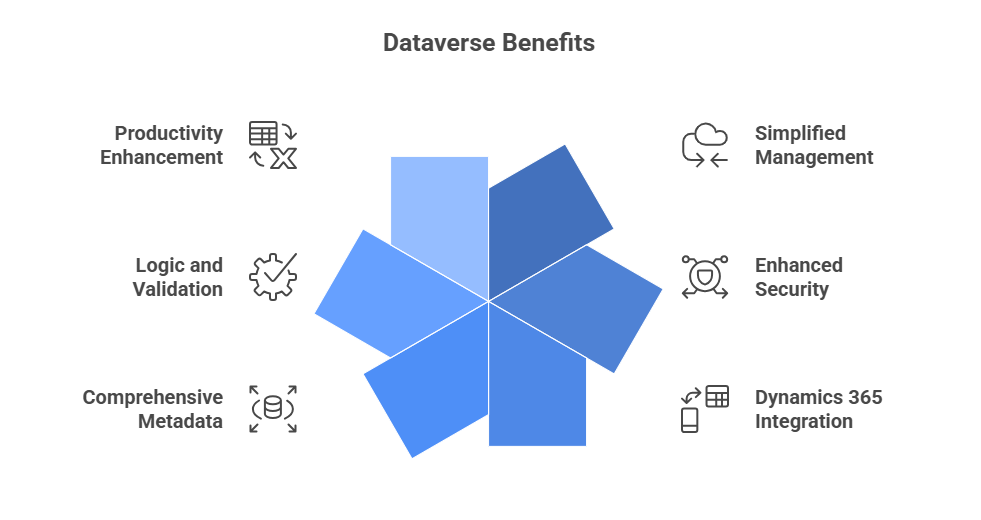
Dataverse offers both standard and custom tables, serving as a secure and cloud-based storage solution for your organizational data. Tables enable you to define your data in a business-oriented manner for application usage and support various Dataverse advantages across enterprise environments. Unsure if tables are the right choice?
Consider the following Dataverse benefits:
Simplified Management
Both metadata and data are stored in the cloud, reducing concerns about storage coordination. This centralized system also supports Dataverse storage capacity planning.
Enhanced Security
Data is securely stored, accessible only to authorized users. Role-based security enables precise control over table access for different organizational users, important for teams evaluating.
Seamless Dynamics 365 Integration
Dynamics 365 and Dataverse work closely together, facilitating the rapid development of apps utilizing this data while extending app capabilities with Power Apps.
Comprehensive Metadata
One can utilize data types and relationships directly within Power Apps, aligning with the Dataverse architecture model.
Logic and Validation Capabilities
Well-defined calculated columns, business rules, workflows, and business process flow maintain data integrity. These represent key Microsoft Dataverse features used in advanced implementations.
Productivity Enhancement
Tables integrate with Microsoft Excel add-ins, bolster productivity, and ensure data accessibility while enabling multiple Dataverse integration possibilities.
How Microsoft Dataverse Powers Modern Business Applications
Microsoft Dataverse empowers organizations to build powerful business applications by providing a centralized, secure, and structured data platform that works seamlessly across the entire Power Platform ecosystem, including Dataverse for Teams.
With its relational tables, business rules, configurable security, and deep integration with Power Apps, Power Automate, Teams, and Dynamics 365, Dataverse ensures that every app whether low-code or enterprise-grade runs consistent, high-quality data. This directly influences When to use Microsoft Dataverse in your digital transformation strategy.
This unified foundation eliminates data silos, improves accuracy, and accelerates app development.
Beyond storage, Dataverse enhances business applications with features such as role-based access control, rich metadata, advanced auditing, workflow automation, and built-in logic.
Its compatibility with Power BI unlocks real-time insights, while connectors and APIs enable advanced integrations with external systems and legacy applications through Dataverse APIs, Dataverse connectors, and the Dataverse SDK.
Whether businesses need scalable operations apps, customer-facing portals, approval workflows, or analytics dashboards, Dataverse delivers the reliability, governance, and scalability needed for modern business solutions.
Key Features of Microsoft Dataverse & Functionality
1) Feasible Integration with Power Platform
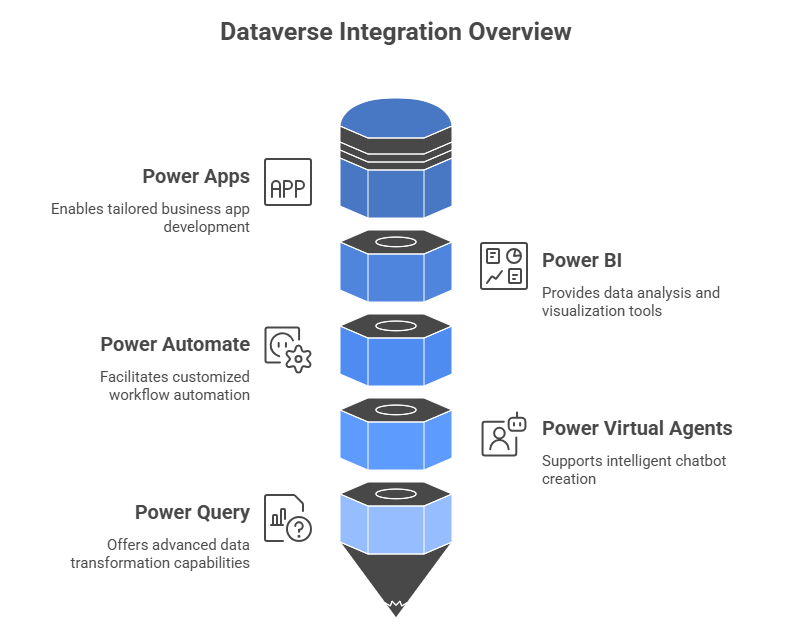
Microsoft Dataverse plays a crucial role within the Power Platform ecosystem, facilitating smooth and scalable Dataverse integration across various components such as Power Apps, Power BI, Power Automate, Power Virtual Agents, and Power Query. These capabilities represent some of the most important Microsoft Dataverse features that support modern business applications.
Power Apps
Users of Power Apps can utilize Dataverse to develop tailored business applications without requiring advanced coding skills. By establishing tables and connections, integrating data into the app becomes seamless. Dataverse’s data storage is inherently compatible with Power Apps, facilitating the creation of comprehensive business solutions that incorporate diverse services, one of the top Dataverse use cases within the Power Platform.
Power BI
The integration of Power BI empowers organizations to analyze essential data sourced from Dataverse. Linking tables to Power BI offers access to a diverse array of visualization tools and reporting capabilities, eliminating the necessity for intricate data migration procedures. This also highlights how Dataverse supports analytics through native Dataverse connectors.
Furthermore, Power BI seamlessly integrates with Dynamics 365 and Dataverse applications, facilitating comprehensive insights spanning various business operations.
Power Automate
It facilitates the creation of customized workflows integrating with Microsoft Dataverse. These workflows automate tasks using various triggers, actions, and conditions, accessed through the Microsoft Dataverse connector, tailored to specific business needs. This automated capability is a foundational part of Dataverse automation use cases.
Power Virtual Agents
Microsoft Power Virtual Agents can utilize Dataverse for storing and retrieving data as required, thus facilitating the creation of intelligent chatbots. This improves conversational business processes by leveraging Dataverse’s structured, secure storage, making it a reliable source for bot-driven applications.
Power Query
Dataverse seamlessly integrates with Power Query, an advanced tool for data transformation and connectivity. With Power Query, you can effortlessly import, merge, and modify data from diverse origins while preserving relational structures. Additionally, you can execute operations like filtering rows, renaming columns, and conducting field calculations. This further strengthens Dataverse integration capabilities for complex data modeling.
2) Integration with Dynamics 365
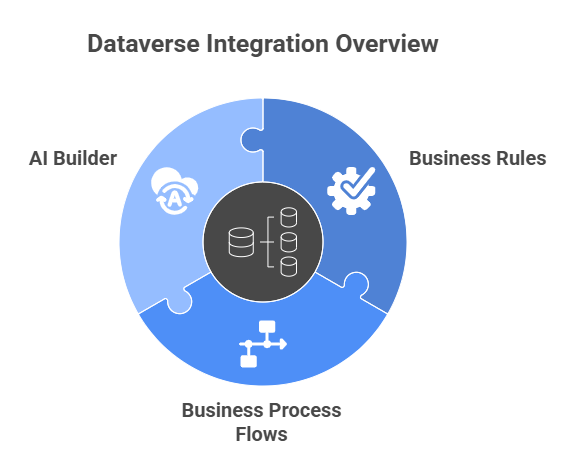
Dataverse seamlessly integrates with essential Microsoft Dynamics 365 components, enabling the efficient implementation of consistent business logic across systems. This synergy between Dynamics 365 and Dataverse enhances reliability, reduces redundancy, and supports key Dataverse use cases across departments.
Creation of Business Rules
Microsoft Dataverse in Dynamics 365 facilitates the creation of business rules without complex coding. This simplifies customization, ensures consistent process execution, and reduces manual errors helping organizations overcome typical Dataverse limitations related to manual business logic management.
Business Process Flows
Business process flows offer a visual depiction of the procedures that an organization undertakes to accomplish a particular objective. By employing a systematic method, these flows can be crafted to navigate intricate security protocols, oversee approvals, and monitor alterations in data. This makes Dataverse a centralized execution layer for multi-step processes.
AI Builder
AI Builder, available in Dataverse and Dynamics 365, revolutionizes digital transformation by integrating machine learning and AI solutions into business applications.
It empowers organizations to enhance decision-making, streamline processes, and drive operational efficiency without requiring deep technical expertise or extensive coding. This is especially valuable in use cases involving intelligent automation and predictive analytics, areas where Dataverse advanced capabilities shine.
3) Security
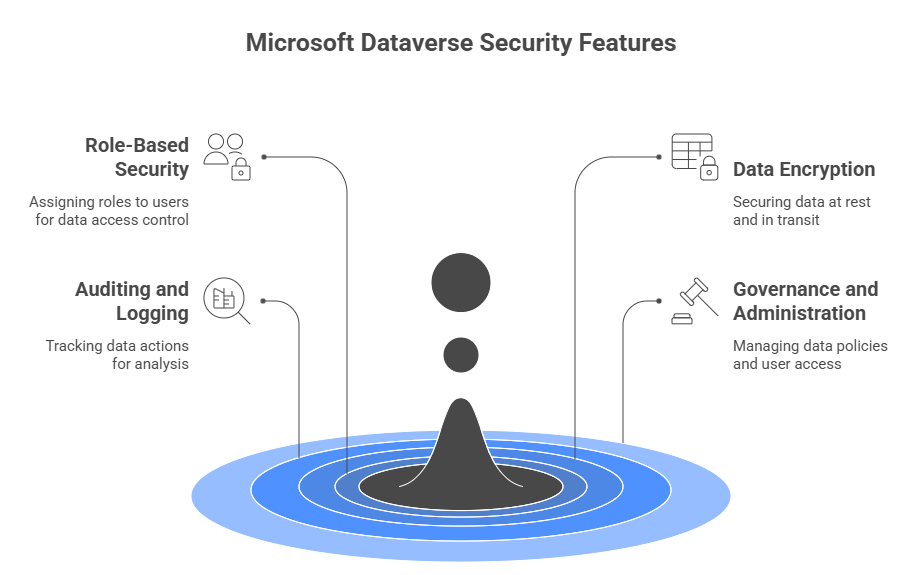
It is important to keep your data safe. Microsoft Dataverse provides you with robust Dataverse security features for secure data storage. One can also easily modify data with secure protection to privacy information, ensuring compliance with enterprise and industry standards.
Role-Based Security
In Microsoft Dataverse, this feature utilizes bundles of privileges grouped into security roles, enabling direct assignments to users or Dataverse entities for safeguarding data access and privacy. These modern role-based structures help organizations maintain consistent governance policies.
Data Encryption
This ensures security both at rest and in transit. Transparent Data Encryption (TDE) encrypts data at rest, while Transport Layer Security (TLS) encryption protects data during transit. Such encryption mechanisms are critical for regulated industries and mitigate key Dataverse limitations around compliance.
Auditing and Logging
This Dataverse in Microsoft feature allows administrators to track various actions such as data creation, modification, and deletion, facilitating quick analysis through audit log reports. These capabilities enable stronger compliance, monitoring, and forensic analysis.
Governance and Administration
Tools in Dataverse offer robust governance capabilities such as setting data loss prevention policies, managing cross-tenant restrictions, and controlling user access via security groups and licenses. These governance layers ensure that Dataverse aligns with enterprise policies and avoids operational risks.
4) Advanced Capabilities of Microsoft Dataverse
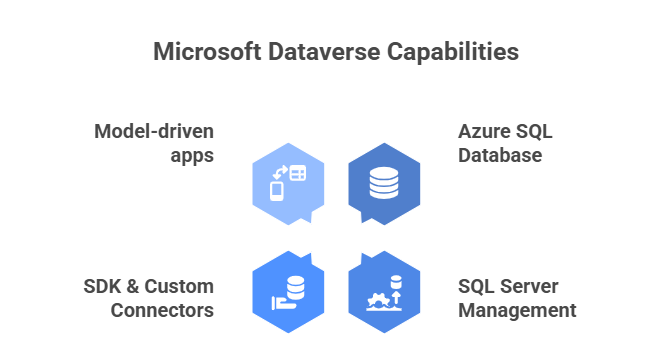
Dataverse continues to evolve through a wide range of advanced features, making it a flexible and scalable platform for enterprise-grade data management.
Azure SQL Database
Dataverse seamlessly integrates with Azure SQL databases and Azure Data Lake, allowing organizations to leverage Azure SQL’s powerful engine for complex data analysis and querying. Whereas Data Lake provides scalable storage for unstructured data. This integration also addresses common questions around Dataverse vs SQL Server by showing how Dataverse works with both cloud and on-prem systems.
SQL Server Management
For businesses deeply invested in SQL Server but dissatisfied with SQL Server Management Studio, Dataverse offers direct integration with on-premises SQL Server databases, facilitating smooth data synchronization and ensuring data consistency across environments. Moreover, Dataverse’s API support enables businesses to develop custom integrations with other systems, expanding its usability beyond the Microsoft ecosystem. These capabilities are part of Dataverse’s broader set of enterprise integration features.
SDK & Custom Connectors
Developers can utilize Dataverse’s SDK to build custom applications, automate tasks, and interact programmatically, enabling the creation of tailored solutions aligned with specific business needs. Custom connectors further enhance integration with third-party services, boosting flexibility in data enrichment and integration workflows, highlighting the strength of Dataverse connectors.
Model-Driven Apps within Dataverse
This empowers businesses to design tailored applications with minimal coding, utilizing low-code development to streamline user interface design and business processes. Additionally, bot-based apps allow for the integration of AI chatbots into Dataverse, improving customer interactions and automating support functions. These use cases showcase Dataverse as a strong enabler of low-code and AI-powered business applications.
Conclusion
Microsoft Dataverse emerges as a modern solution for organizations seeking a scalable, flexible, and secure platform to manage data. With seamless support for Dynamics 365, Power Apps, Power BI, and Power Automate, it fits a wide range of Dataverse use cases, making it a strong choice even when evaluating Dataverse benefits, Dataverse architecture, and Dataverse advantages.
Are you all Set for Microsoft Dataverse Implementation? Why wait?
FAQs
What is Microsoft Dataverse and how does it differ from traditional databases?
Microsoft Dataverse is a cloud-based, secure, relational data platform that differs from traditional databases by offering built-in governance, integration, low-code extensibility, and seamless connectivity with the Microsoft Power Platform.
How can organizations securely store and manage business data using Dataverse?
Organizations securely store and manage business data in Dataverse through encrypted storage, role-based access control, auditing, and centralized governance built into the Microsoft cloud.
What are the key features of Dataverse that support app development on the Microsoft Power Platform?
Dataverse supports app development with features like standardized tables, relational modeling, business rules, advanced security, rich data types, and native integration with Power Apps, Power Automate, and Power BI.
How does Dataverse integrate with Microsoft Power BI, Microsoft Power Automate and other Microsoft services?
Dataverse integrates seamlessly with Power BI, Power Automate, and other Microsoft services through native connectors, shared schemas, and real-time data connectivity.
What security and governance capabilities does Dataverse provide for enterprise data?
Dataverse provides enterprise-grade security and governance through role-based permissions, field-level security, row-level access, audit logs, encryption, and data loss prevention policies.
When should a business consider using Dataverse versus other data storage options?
A business should use Dataverse when it needs secure, governed, scalable data storage that integrates deeply with the Microsoft ecosystem and supports low-code app development.
How can developers extend Dataverse with custom connectors, SDKs and integrations for advanced scenarios?
Developers extend Dataverse using custom connectors, the Dataverse Web API, SDKs, Azure integrations, and external services to support advanced and scalable application scenarios.